Founding 50: 30% off your first year.

See NORD at work

Pick a question for the adviser on a sample company's books, then walk through a normal week: an invoice, a receipt, the month's figures and the VAT return.

A sample company with fictional figures, and the adviser's answers written in advance from its books. No email, nothing to install; screens may change before 1 January 2027.

NORD AI
On the sample company's books
You
Why did expenses go up in September?
NORD AI

Expenses were AED 86,300 in September, up 16.5% on August.

The sharpest jump is office supplies: AED 4,120, up 58% on their three-month average, from two orders at Desert Office Supplies LLC on 12 and 26 September.

If the second order was for the new office, you could tag it as a one-off so October's comparison stays clean.

Suggested: Tag the 26 September order as a one-offNothing posts until you approve.
The adviser explains and suggests. You approve before anything posts.

A normal week

Four jobs, step by step

Each one step by step, with the sample company's figures.

Pick a job; its steps show below
  1. Pick the customer. Their TRN and address come with them.
  2. Add the lines. The VAT on each one is set from the item and shown as you type.
  3. Check the title. A registered customer gets a tax invoice with both TRNs, in English or Arabic.
  4. Send it by email, or download the PDF.
  5. Record the payment when it lands, and the invoice turns to paid.

The invoice lands in the books with its VAT, and the month's figures move with it.
  1. Photograph the receipt.
  2. The vendor, date, amount and VAT are read for you. Confirm the one field it is unsure of.
  3. Pick the category, or accept the one it suggests.
  4. Approve. The expense is posted with its VAT, and the photo stays attached.

The receipt becomes an expense with its VAT, ready for the return.

  1. Open the dashboard. Revenue, expenses, cash and profit for the month, with the change against last month.
  2. Read the attention cards. The two or three things that need a decision this week.
  3. Open any figure. The entries behind it are one tap away.
  4. Ask the adviser why a figure moved. It answers from your own entries, in plain words.
  5. Approve or ignore its suggestion. Nothing posts until you say so.

The month on one screen, and the reason behind any figure.

  1. Open VAT and Corporate Tax. The quarter's output and input VAT come from every invoice and bill you entered.
  2. Open the return. It is prepared from the books, box by box.
  3. Open any box to see the entries behind its figure.
  4. The year's Corporate Tax estimate sits beside it, with the adjustments listed.

You file the return yourself, with every figure ready.

Do this with your own books from 1 January 2027. Sign up now and your Founding 50 terms are kept.

Sign up

The screens

More of the product

The pages you would open each week, with the sample company's figures.

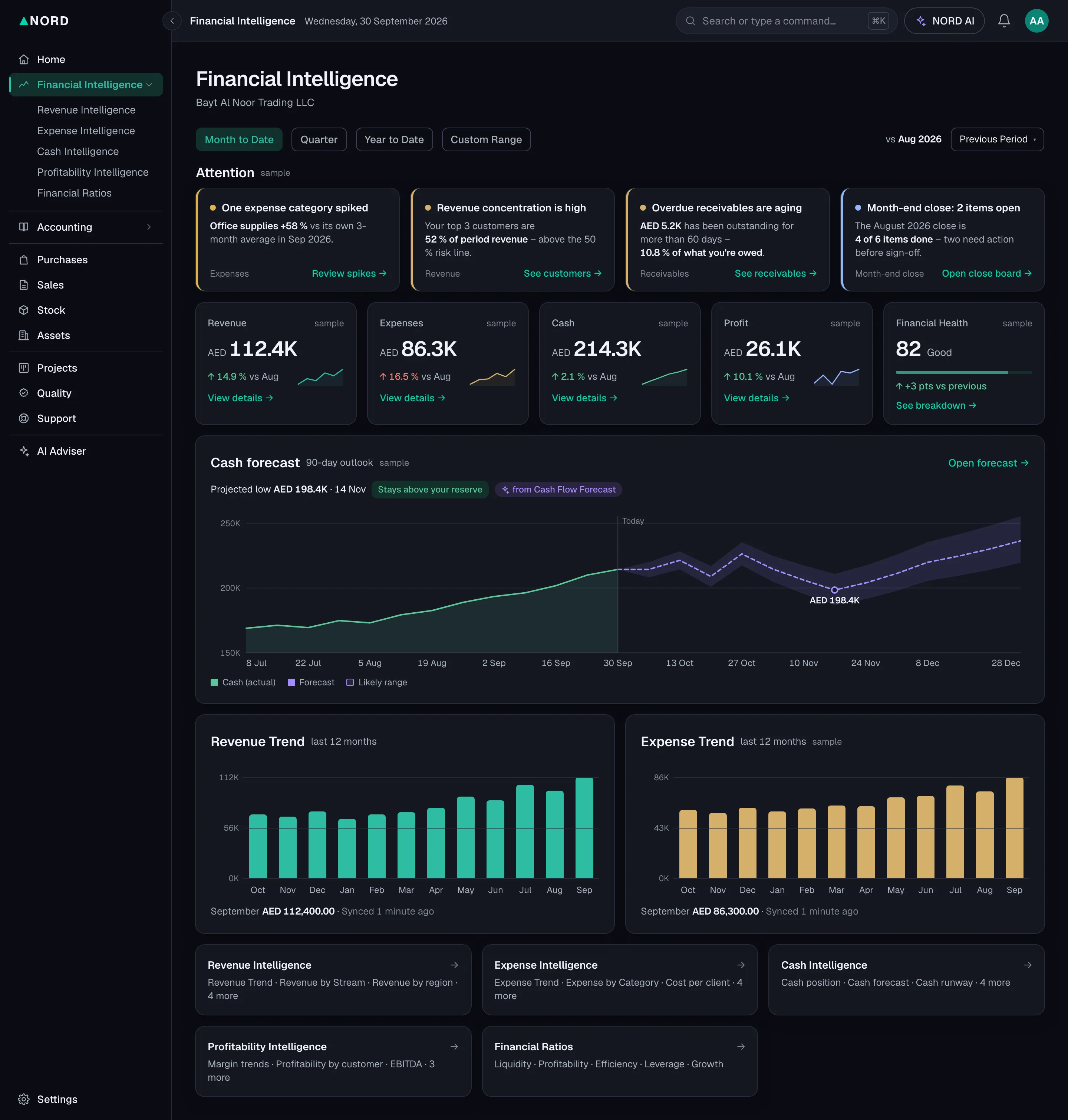
  • The Financial Intelligence page: attention cards, revenue, expenses, cash and profit for the month, the cash forecast and the revenue trend. Sample company, fictional data.

    Financial Intelligence

    The month's revenue, expenses, cash and profit, what needs attention, and the trends.

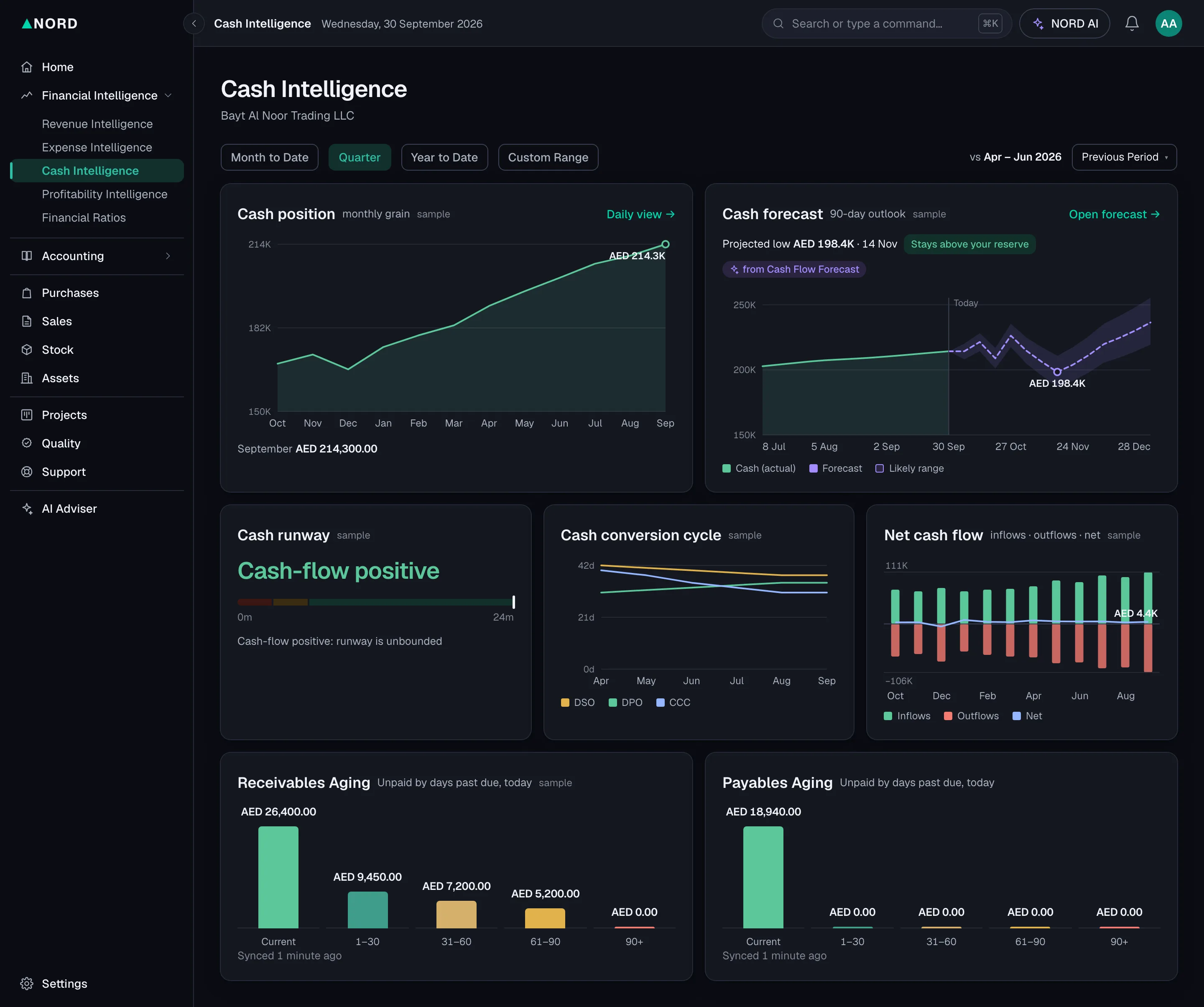
  • The cash page of Financial Intelligence: cash position, the 90-day forecast, receivables and payables by age. Sample company, fictional data.

    Financial Intelligence: Cash

    The cash position, a 90-day forecast, and what is owed both ways, by age.

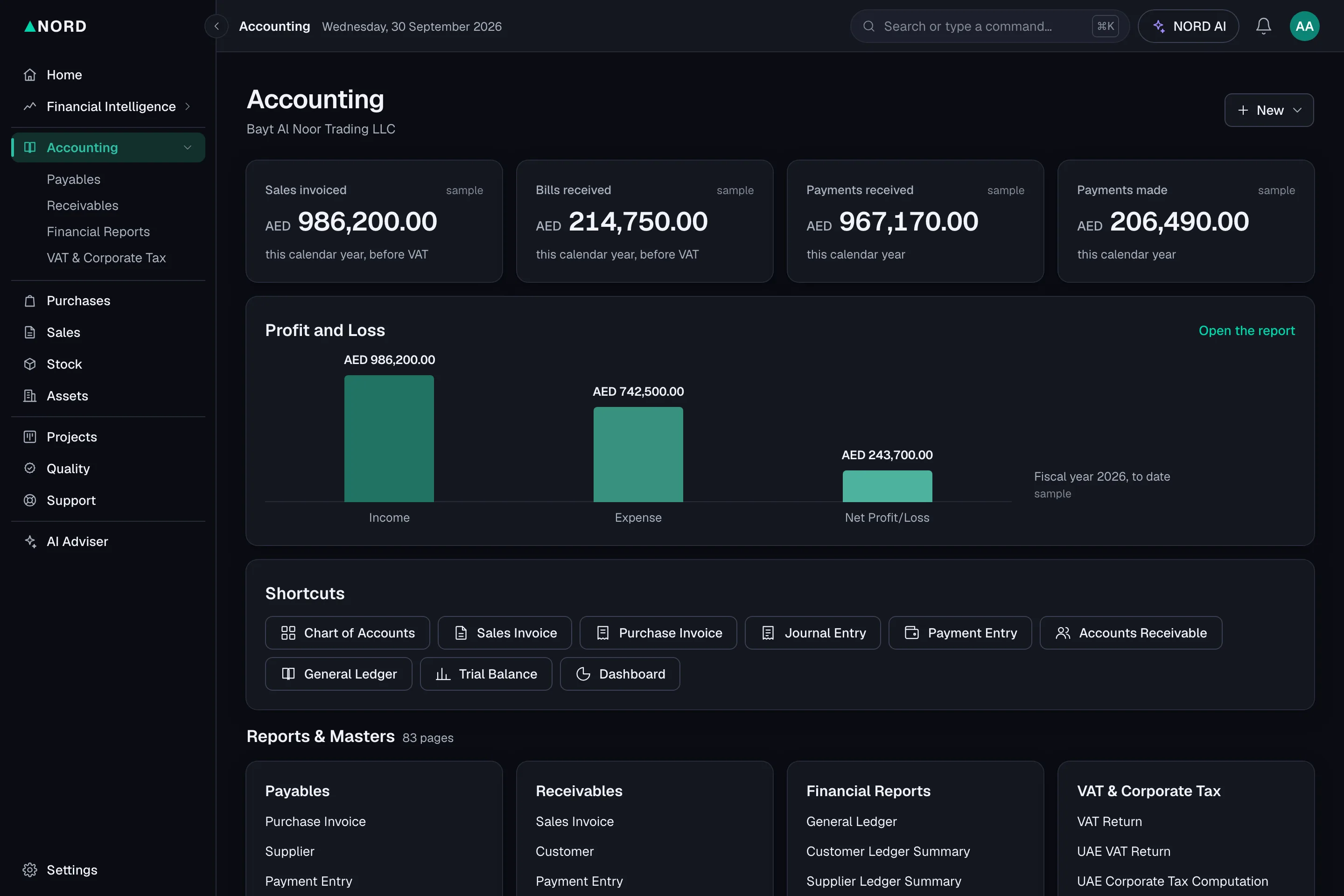
  • The Accounting page: sales invoiced, bills received, payments in and out, the profit and loss for the year, shortcuts and the reports. Sample company, fictional data.

    Accounting

    The year's sales, bills and payments, the profit and loss, and every report one click away.

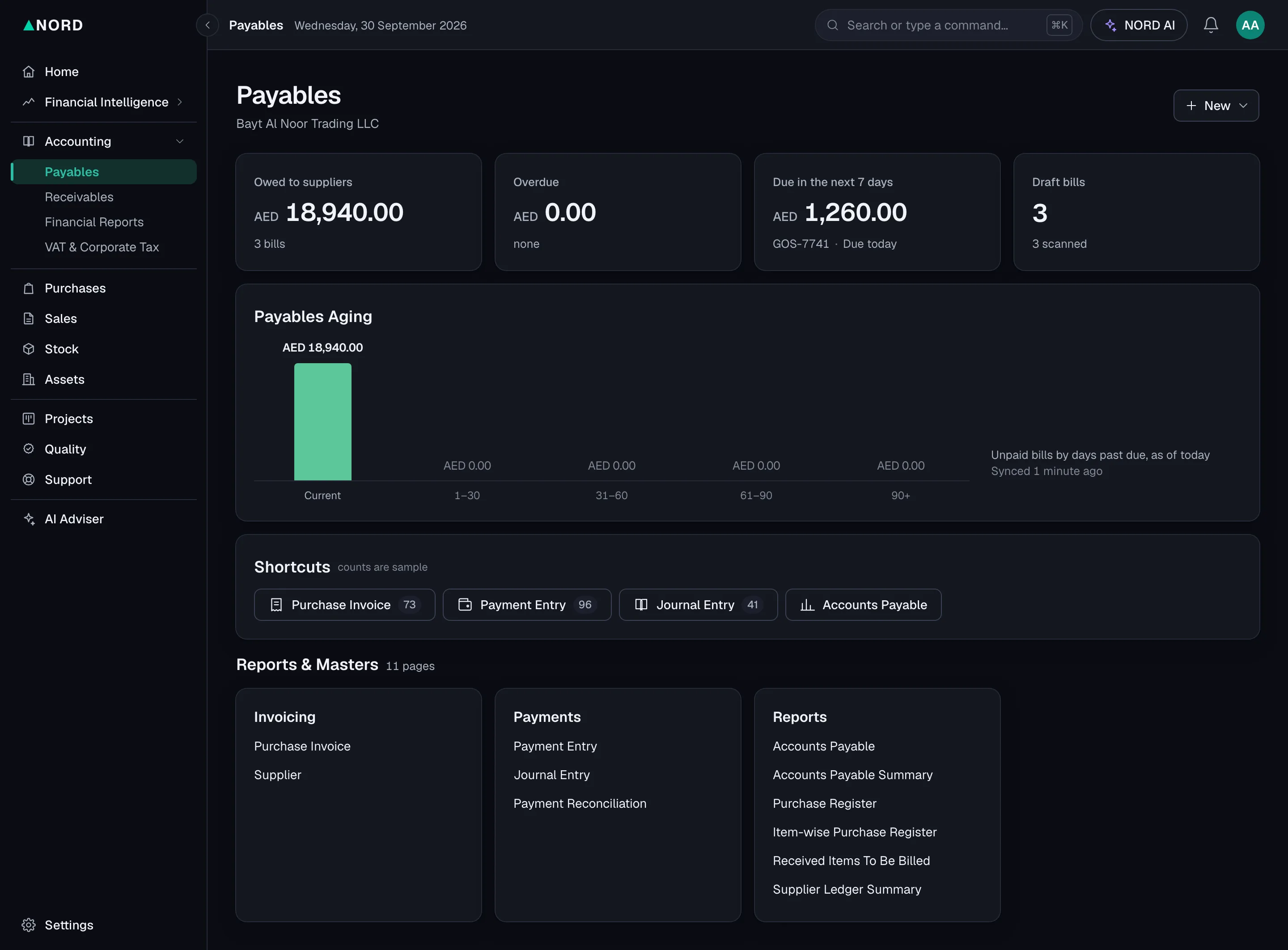
  • Payables: what is owed to suppliers, overdue and due in the next seven days, with the bills by age. Sample company, fictional data.

    Payables

    What you owe suppliers, by age, and what falls due in the next seven days.

On your own numbers

Rather see it with your own books?

Book a call with a qualified accountant and see NORD with one of your own invoices. There is no recorded video or tour to watch.

Book a call 20 minutes

What we cover

  1. Your current setup: who keeps the books today and what takes the time
  2. One live example from your own invoices
  3. What opens on 1 January 2027, and which plan fits

Questions about the demo

Is this real data?

No. The demo runs on a sample company with fictional figures, and the adviser's answers here are written in advance from its books. The screens show NORD as designed for launch, and they may change before 1 January 2027.

Who can see my books?

You decide who logs in: you and the users you add.

Can my accountant log in?

Yes. Standard includes 3 users and Pro 5; give one to your accountant and they work in the same books you see.

What language does the adviser use?

English, today. The screens and every document are in English and Arabic.

I keep my books in Excel, Zoho, Xero or Wafeq. Can I bring them across?

Importing your books from another system is coming. Until then you start from your opening balances.

Does NORD file my VAT return?

You file it yourself. NORD prepares the return from your books, box by box, with the entries behind each figure one click away. A NORD accountant can review it each quarter (AED 249), and the first review is free for the Founding 50.

What does it cost?

Three plans from AED 99 a month, excl. tax. The Founding 50 take 30% off their first year.

See pricing

Clear as north. From 1 January 2027.

Claim a Founding 50 place: 30% off your first year, locked for 12 months. On every plan, your first paid month is refunded on request within 30 days of paying. No card, cancel any month. Or book a 20-minute call and see it on your own numbers.